
Can Claude read your Apple Notes?

Short answer: on a Mac, yes. On iPhone and in the browser, no. I get asked this a lot, so here's why it depends on where you use Claude, and what each option can and can't do.
Why it depends on where you use Claude
Apple Notes has no public API. Your notes live in iCloud, and Apple doesn't let outside services read them there. The only way in is the Notes app itself, on a Mac, through AppleScript. So anything that connects Claude to Apple Notes has to run on a Mac that has your notes on it, and it only works while that Mac is on.
Claude on the web and Claude on iPhone run in Anthropic's cloud. They can only reach apps that offer a server on the internet, and Apple Notes doesn't have one.
Apple Notes API: what exists and what to use instead goes into the scripting side.
Your options
| Where it works | What Claude can do | Setup | |
|---|---|---|---|
| Copy and paste | Anywhere | Read what you paste; you copy the answer back | None |
| Claude desktop extension for Apple Notes | Claude desktop app on your Mac | Read your notes, per Anthropic | Install it from the connectors directory in Claude for Mac |
| Community Apple Notes MCP server | Claude Desktop or Claude Code on your Mac | Search, read, create and edit, depending on the server | Install it and edit Claude's config; allow Automation in macOS |
| A notes app with its own MCP server, like Amber Notes | Claude on the web, desktop, iPhone and Claude Code | Search, read, create and edit, with your approval and Undo | Import your notes once, then add a custom connector |
Option 1: the Claude desktop app on a Mac
Claude's connectors directory includes desktop extensions, which work with apps on your computer. Anthropic's own tutorial says Claude “can read your Apple Notes on desktop”. It's the simplest route if you only use Claude on your Mac and mostly want Claude to read. Check what it can change before you rely on it for edits.
Option 2: a community MCP server
Developers have built MCP servers that drive the Notes app with AppleScript. The most actively maintained one in September 2026 is sweetrb/apple-notes-mcp, which can search, create and update notes. Follow its README to add it to Claude Desktop or Claude Code. Expect a macOS prompt asking whether Claude may control Notes.
Things to know:
- It only works on the Mac it's installed on, while that Mac is awake.
- AppleScript reads and writes a note as HTML, so depending on the server, an edit can lose formatting such as checklists.
- Apple Notes keeps no version history, so a change Claude makes can't be rolled back from the Notes app.
- Locked notes can't be read.
Option 3: move your notes to an app Claude can reach
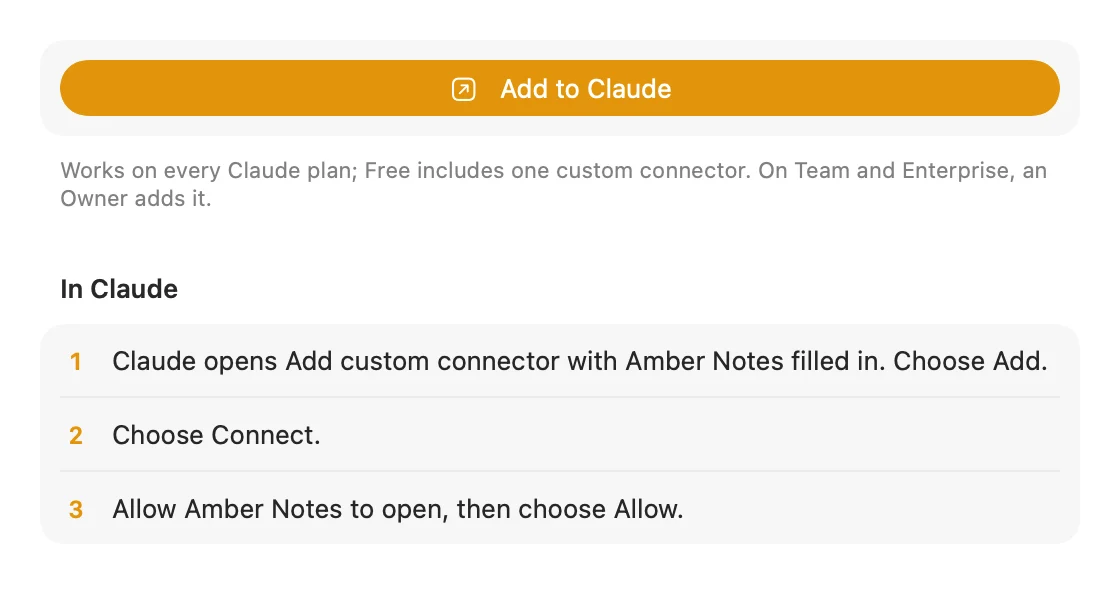
Amber Notes is a free, open-source notes app for iPhone and Mac that works like Apple Notes and has an MCP server built in. You import your Apple Notes once, on your Mac, and add Amber Notes to Claude as a custom connector. After that Claude can search, read and edit your notes from claude.ai, the desktop app, the iPhone app and Claude Code.
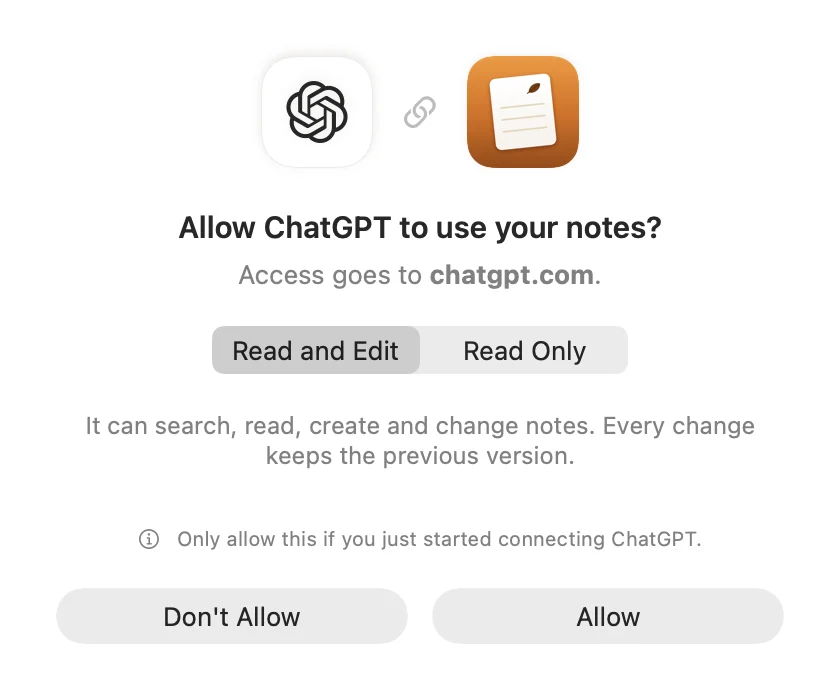
- You approve Claude in Amber Notes and choose Read Only, or Read and Edit.
- When Claude changes a note, Amber Notes shows what changed, with Undo, and keeps the previous version.
- Custom connectors work on every Claude plan. The free plan includes one.
The catch: your notes move to Amber Notes, so you'd write there instead of in Apple Notes. The import leaves Apple Notes untouched, so you can try it and go back. How to move from Apple Notes, then connect Claude. For Claude Code, see using your notes from Claude Code and Codex.
Which one to pick
- You use Claude only on your Mac and want it to read notes: the desktop extension.
- You're comfortable with a config file and want Claude to write to Apple Notes on your Mac: a community MCP server.
- You want Claude to use your notes from your phone or the web, with a way to undo its changes: a notes app with its own MCP server. Notes apps with an MCP server, compared lists them.
Questions
Can Claude read my Apple Notes?
Yes, on a Mac. The Claude desktop app can read Apple Notes through a desktop extension, and community MCP servers let Claude Desktop and Claude Code search and change notes. It all runs on the Mac where your notes are, so it doesn't work from Claude on iPhone or on the web.
Can Claude on my iPhone see my Apple Notes?
No. Apple Notes has no public API and no way for an outside service to reach your notes in iCloud, so nothing can connect Claude on iPhone or claude.ai to them. The only way is to move your notes to an app that has its own MCP server.
Is there an official Apple Notes MCP server?
Apple doesn't make one. The Apple Notes MCP servers you'll find on GitHub are community projects that drive the Notes app on your Mac through AppleScript.
Checked against the app on .


