
The Amber Notes MCP server

Amber Notes, the notes app for iPhone and Mac, has a remote MCP server built in. This page is for developers and anyone curious how it works: the address, how an AI app signs in and gets approved, and every tool it can call.
The address
https://mcp.ambernotes.app- Transport: MCP Streamable HTTP, answering with JSON. There is no server-sent stream; clients post each request.
- Protocol versions: 2025-11-25, 2025-06-18, 2025-03-26 and 2024-11-05.
- Server name:
amber-notes. It sends instructions oninitializethat tell the model how the notes are laid out.
How access works
There are two ways in. Both need an Amber Notes account, and both are approved by the person.
Sign in with OAuth (ChatGPT, Claude and other apps)
- An unauthenticated request gets a 401 with a
WWW-Authenticateheader pointing to the protected resource metadata, at the address above plus/.well-known/oauth-protected-resource. - The client registers itself (dynamic client registration) and starts OAuth 2.1 with PKCE (S256). Scopes are
notes:readandnotes:write. - The authorization server metadata is at the address above plus
/.well-known/oauth-authorization-server. - The authorization step opens
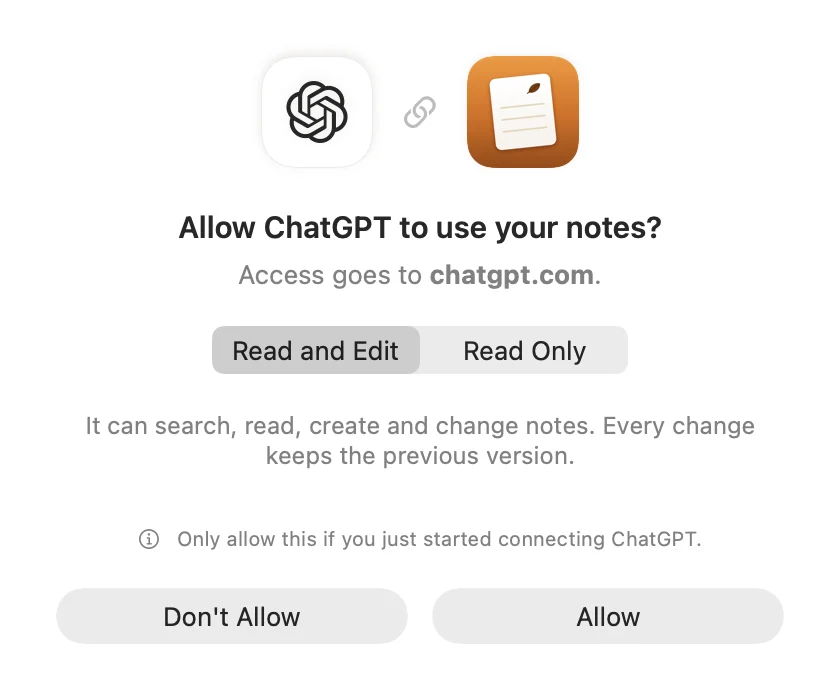
ambernotes.app/connect. The person opens Amber Notes from there, or signs in on the page (email and password, or Sign in with Apple). Either way they see “Allow [app] to use your notes?” and where access goes, choose Read and Edit, or Read Only, then Allow. - The client gets an access token (valid for an hour) and a refresh token. The tokens only open this server.
Access token (Claude Code, Codex and scripts)
In Amber Notes, Settings, Connect an AI, Claude Code or Codex creates a token starting with pane_, read only or read and edit. Send it as Authorization: Bearer pane_…. The Claude Code and Codex guide has the exact setup.
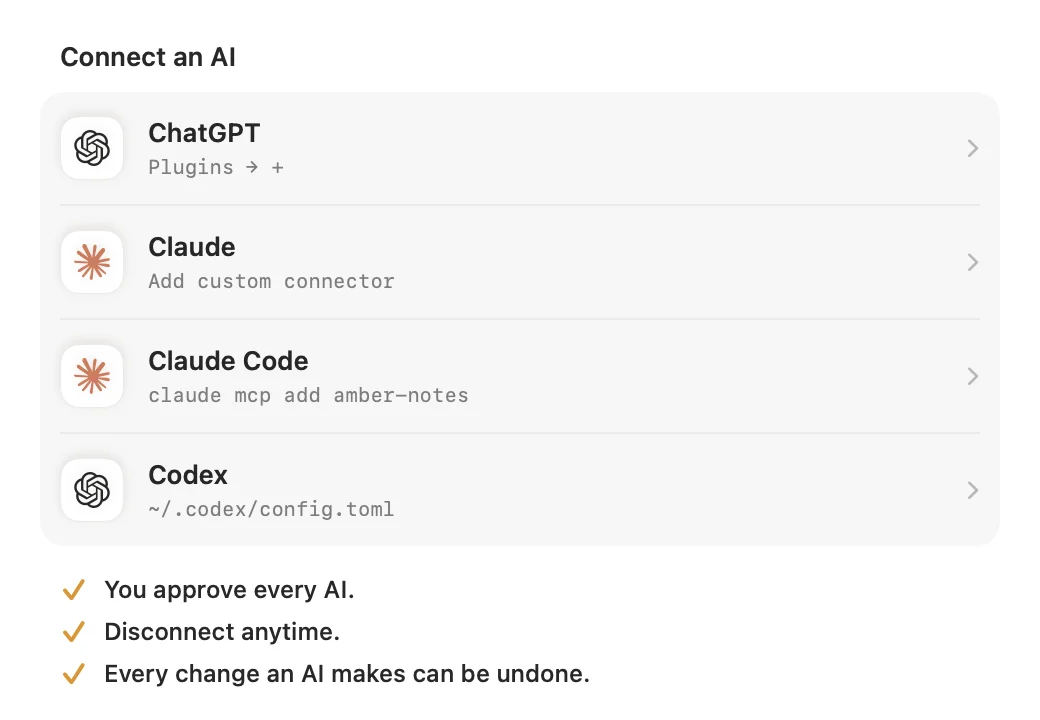
Every connection shows up in Amber Notes under Connected, and the person can disconnect it at any time. Each tool call runs as that person, with row-level security, so a token can only ever reach its owner's notes. Calls are rate limited per account.
What happens to changes
- Every edit keeps the previous version.
note_historylists them andrestore_revisionputs one back. - In the app, the person sees what an AI changed, with Undo.
- Deleted notes go to Recently Deleted for 30 days and can be restored with
restore_note. - A read-only connection only sees the tools marked reads below.
Tools
Notes are markdown, and the first line is the title. Checklists are - [ ] lines, and tables are markdown tables. Start with get_overview or search_notes, and read a note before editing it.
get_overview(reads). An overview of the person's Amber Notes: folders with counts, pinned notes and the most recently edited notes.search_notes(reads). Full-text search across titles and bodies. Returns ranked notes with a highlighted snippet («match»).list_notes(reads). List notes, newest first, optionally in one folder. Use for browsing; use search_notes to find something.read_note(reads). Returns a note's markdown with its folder, dates, version and outline. For long notes, read a line range; set line_numbers to see where headings are.create_note(changes). Creates a note from markdown. The first line becomes the title (write it as plain text or '# Title').edit_note(changes; can remove or replace). Precise edits: each old_text must match the note exactly once (copy it from read_note) and is replaced by new_text. Edits apply in order. Fails without changing anything if one doesn't match.append_to_note(changes). Adds markdown to the end of a note, or to the end (or start) of the section under a heading. Good for logs, lists and journals.replace_note_body(changes; can remove or replace). Replaces the whole note with new markdown. Use only for full rewrites; prefer edit_note. The person sees the change in Amber Notes with Undo, and the old version stays in history.set_checklist_item(changes). Checks or unchecks a '- [ ] item' line, matched by its text.move_note(changes). Moves a note to another folder, creating the folder if it doesn't exist. Use a path like "Work/Clients" to nest.pin_note(changes). Pins a note to the top of the list, or unpins it. Pinned state shows as `pinned` in every note listing.delete_note(changes; can remove or replace). Moves a note and its sub-notes to Recently Deleted. This can be undone: restore_note brings it back within 30 days.restore_note(changes). Brings a note (and its sub-notes) back from Recently Deleted.list_folders(reads). All folders as paths like "Work/Q4 planning", with how many notes each shows in the app.create_folder(changes). Creates a folder; use a path like "Work/Clients" to nest it.rename_folder(changes). Renames a folder in place. Its notes and sub-folders stay inside it.delete_folder(changes; can remove or replace). Deletes a folder and its sub-folders. Their notes (and those notes' sub-notes) go to Recently Deleted, and each can be brought back with restore_note within 30 days; the folders themselves are not restored.note_history(reads). Earlier versions of a note, newest first, with who changed it (app or an AI client).restore_revision(changes; can remove or replace). Puts an earlier version (from note_history) back as the note's body. The current body is kept in history too.create_sub_note(changes). Creates a note that lives inside another note: it's linked from the parent (a [Title](pane-note:id) line added at the end, or under a heading) and doesn't show in the main list.list_files(reads). Files kept in Amber Notes (PDFs, spreadsheets, images…), newest first, with the notes that embed them.get_file(reads). Details of a file and a download link valid for 10 minutes, so you can fetch and read it (PDF, spreadsheet, image…).read_table(reads). Reads a table in a note: its columns (with types and allowed values for trackers) and its rows as objects. Use before logging so you use the right column names and values.log_table_row(changes; can remove or replace). Adds a row to a table. In a tracker with a date column it updates that date's row if there is one (the date defaults to today). Values are checked against each column's type: scales must be in range, choices one of the options, Yes/No also takes true/false.delete_table_row(changes; can remove or replace). Removes the row for a date (trackers) or at a 0-based row index from a table.search(reads). Search the person's Amber Notes by words or phrases. Returns note ids and titles; read one with fetch.fetch(reads). Fetch an Amber Notes note by id (from search) as its full markdown, with folder, pinned state and last edit time.
search and fetch follow the shape ChatGPT expects for searching and reading. Every tool carries MCP annotations (readOnlyHint, and destructiveHint where it applies), so clients can ask before a change.
Connect it
- Connect ChatGPT or Claude to your notes: add the address as a custom app or connector.
- Use your notes from Claude Code and Codex: one command, or a few lines of config.
- Incredible, and anything else that speaks MCP: add the address and sign in when it asks.
Choosing a notes app for an agent? The best notes app for AI agents sets out the criteria.
The server is open source. Read it in supabase/functions/mcp on GitHub.
Checked against the app on .


