
How to connect ChatGPT to your notes

I wanted to ask ChatGPT to add to a list, plan a trip or tidy a note, and have the change land in my notes instead of in a chat I'd have to copy from. That's what Amber Notes does. Here's how to set it up in a few minutes, and how you stay in control.
How it works
ChatGPT and Claude can use apps that offer an MCP server. MCP (Model Context Protocol) is an open standard that lets an assistant find, read and change things in another app. Amber Notes, the notes app for iPhone and Mac, has one built in. Once you connect it, ChatGPT can search your notes, read them, write new ones and edit the ones you have.
Apple Notes doesn't have one. On a Mac, ChatGPT can look at a note you have open, but it can't search your notes or save changes to them. If you're wondering why, why AI apps can't reach Apple Notes explains it, and notes apps that work with ChatGPT compares the alternatives.
What you need
- Amber Notes on your Mac, signed in. It's free. Download it here.
- ChatGPT Plus, Pro, Business, Enterprise or Edu. Adding your own app needs Developer mode, which the free plan doesn't have.
- ChatGPT on the web, for the first step. After that, it works in the ChatGPT apps too.
Connect ChatGPT
- In Amber Notes, open Settings (Amber Notes, then Settings, or ⌘,). If your notes are in Apple Notes, import them first.
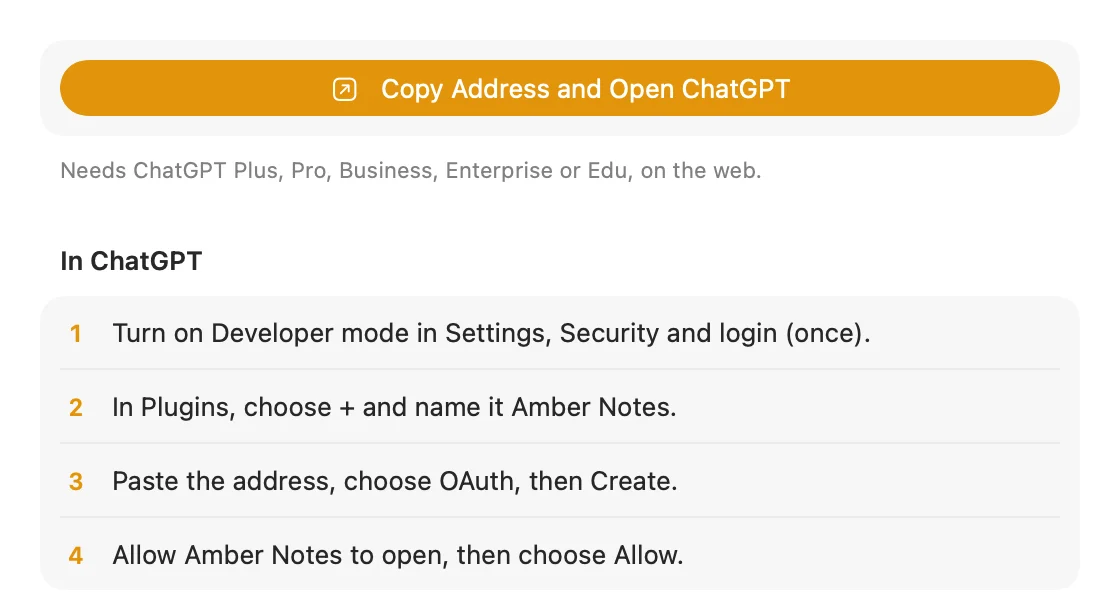
- Under Connect an AI, choose ChatGPT, then Copy Address and Open ChatGPT. Amber Notes copies its address and opens ChatGPT's Plugins page. The steps stay on screen while you work.
- In ChatGPT, turn on Developer mode in Settings, Security and login. You only do this once.
- In Plugins, choose + and name it Amber Notes.
- Paste the address, choose OAuth, then Create.
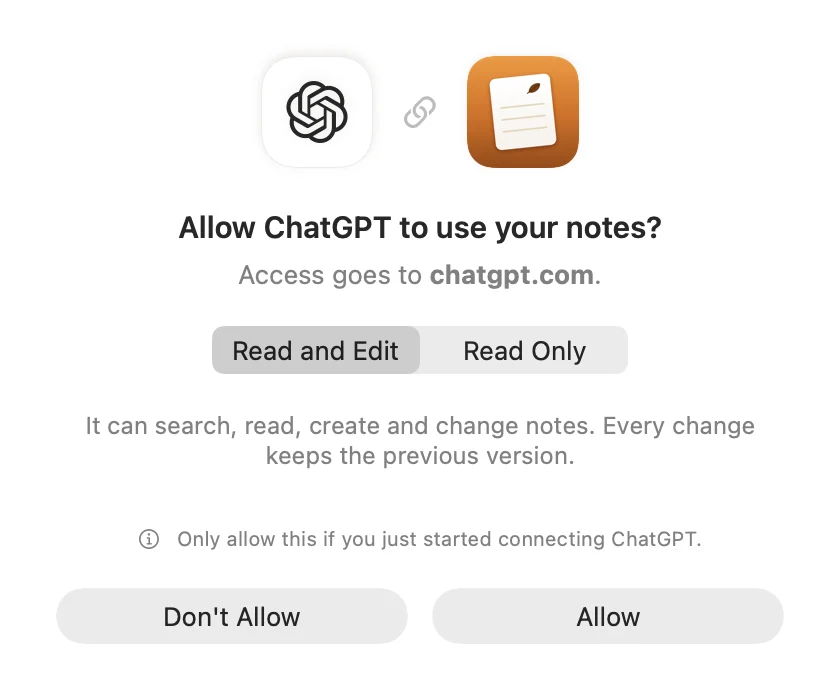
- ChatGPT asks Amber Notes for permission. A page on ambernotes.app opens: choose Open in Amber Notes, or sign in right there. Either way you see “Allow ChatGPT to use your notes?” Pick Read and Edit, or Read Only, and choose Allow.
- Try it. Ask ChatGPT: “Search my Amber Notes and tell me what I wrote most recently.”
OpenAI renamed some of these pages in 2026. If you see Connectors or Apps instead of Plugins, it's the same place.
Claude
Under Connect an AI, choose Claude, then Add to Claude. Claude opens its Add custom connector dialog with Amber Notes already filled in. Choose Add, then Connect, then Allow. It works on every Claude plan. The free plan includes one custom connector, and on Team and Enterprise an Owner adds it for the organization.
Claude Code and Codex
These use an access token instead of a sign-in. On a Mac, choose Claude Code under Connect an AI and then Add to Claude Code, or copy the command it shows. For Codex, Amber Notes gives you a few lines to paste into ~/.codex/config.toml.Using your notes from Claude Code and Codex has the details.
Incredible and other MCP apps
Incredible, the AI assistant my company makes, connects the same way as any other app that supports MCP: add the Amber Notes server address, https://mcp.ambernotes.app, and sign in when it asks, then choose Allow. The Amber Notes MCP server page has the address, the sign-in and every tool.
You stay in control
- Nothing is shared until you choose Allow, in Amber Notes or signed in to your account on ambernotes.app.
- You choose Read Only, or Read and Edit, for each assistant.
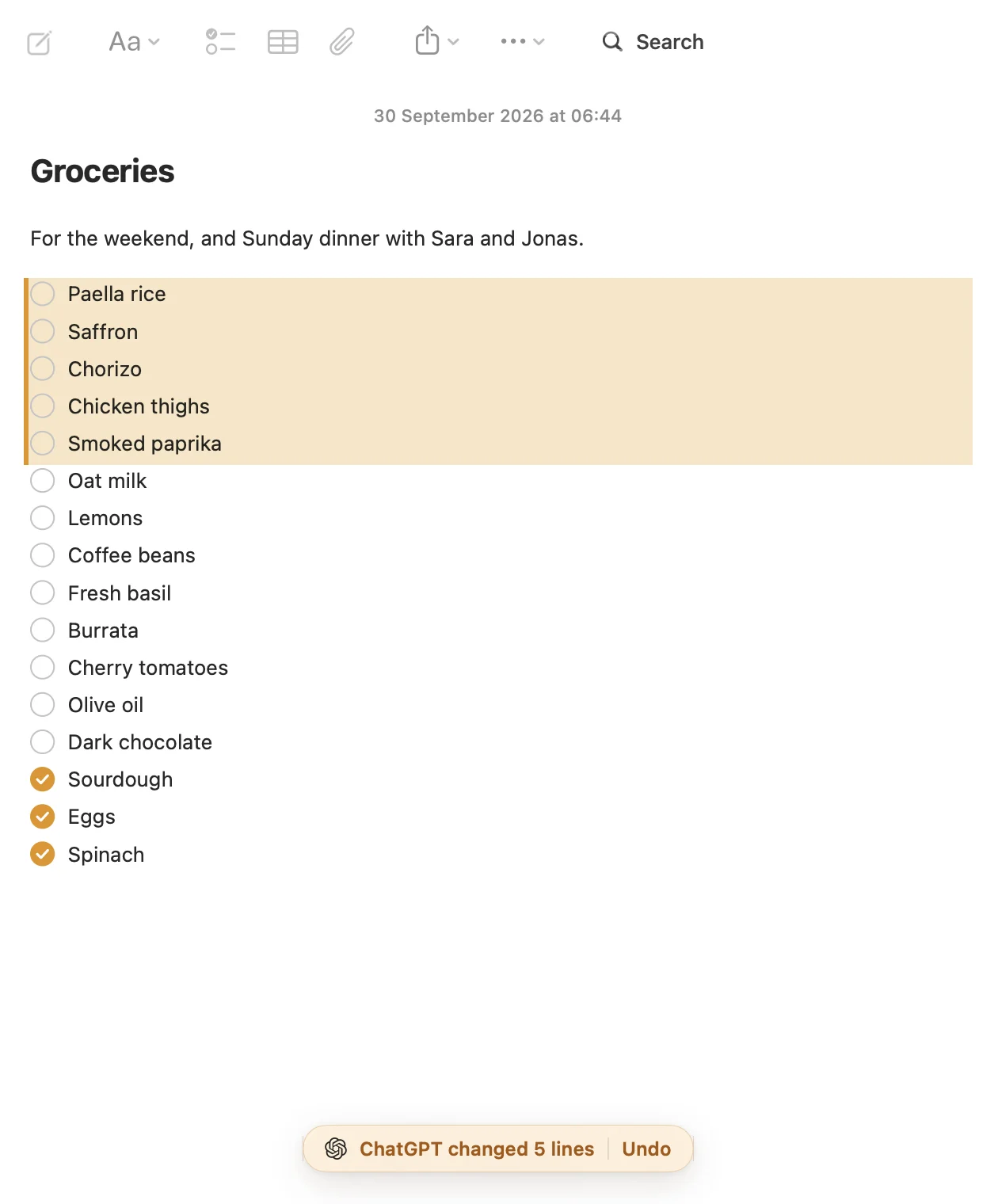
- When an assistant changes a note, Amber Notes shows what changed, with Undo. The previous version is kept in the note's version history (File, then Show Version History).
- Settings lists everything that's connected. Choose Disconnect, and it loses access right away.
Things to ask
- “Plan 4 days in Lisbon for us and save it to my notes.”
- “What did I write about the kitchen measurements?”
- “Turn my meeting notes into a checklist of next steps.”
- “Add today's standup to my work notes.”
Stuck? The help page has the short version, and you can message me on X.
Questions
Which ChatGPT plans can add Amber Notes?
Adding your own app in ChatGPT needs Developer mode, which OpenAI offers on Plus, Pro, Business, Enterprise and Edu, on the web. The free plan can't add one.
Does it work in the ChatGPT app on my phone?
Yes. You add Amber Notes once in ChatGPT on the web. After that, it's available in the ChatGPT apps too.
Can ChatGPT delete my notes?
Only if you chose read and edit. A deleted note goes to Recently Deleted for 30 days, and every change keeps the previous version in the note's history, so you can undo it.
Checked against the app on .


