Obsidian MCP servers compared (2026)

Search for an Obsidian MCP server and you get a long list of GitHub projects. I went through the main ones in September 2026 and checked each against its own README and release history. Here's how they work, what each can do, how to set up the best one in Claude, and the limits they share. I make Amber Notes, a different notes app, so weigh that part with that in mind.
How Obsidian works with AI
An Obsidian vault is a folder of Markdown files on your computer. That's what makes Obsidian great for local-first power users: the notes are plain files you own, any tool can read them, and plugins can add almost anything. It also means an AI app can reach your notes in two ways.
- Through Obsidian, with a plugin. The plugin runs inside the Obsidian desktop app, so it knows about links, tags and frontmatter, and can run Obsidian commands. Obsidian has to be open.
- Through the files, with a server that reads and writes the Markdown in your vault folder. Obsidian can be closed, but the server doesn't see what Obsidian knows about the vault.
MCP (Model Context Protocol) is the open standard that connects the two sides: a server gives an AI app tools such as “search notes” or “edit a note”, and the AI calls them when you ask. Obsidian doesn't make an MCP server. The nearest official thing is Obsidian CLI, added in Obsidian 1.12, which lets you control the app from the terminal. A coding agent like Claude Code can run those commands, but ChatGPT and Claude on the web or your phone can't.
One change in 2026 matters most. The Local REST API plugin, which most Obsidian MCP servers were built on, got an MCP server of its own in version 4.0 in May. Its README now says the separate servers are no longer necessary.
The servers compared
| Server | How it reaches the vault | What the AI can do | Setup | AI apps | Status |
|---|---|---|---|---|---|
| Local REST API with MCP | An Obsidian plugin with an MCP server built in, since version 4.0 in May 2026 | Read, write, append, move, copy and delete notes; edit one heading, block or frontmatter field; search; list tags; read attachments and images; run Obsidian commands | Install the plugin in Obsidian, copy its API key, add the address to your AI app | Claude Code, Cursor and other apps that connect to a local HTTP server; Claude Desktop through mcp-remote | Maintained; version 5.3.1 on 28 September 2026; MIT |
| MarkusPfundstein/mcp-obsidian | A Python server that talks to the Local REST API plugin | List, read, search and write notes; append; edit one heading, block or frontmatter field; daily notes and recent changes; delete | Install the plugin, then add uvx mcp-obsidian with the API key to your AI app's config | Claude Desktop and other apps that run local servers | Maintained; last changed 31 August 2026; MIT; the most starred, about 4,400 stars |
| cyanheads/obsidian-mcp-server | A Node.js server that talks to the Local REST API plugin | Read, write, search and replace in notes; edit sections, frontmatter and tags; delete after you confirm; can limit the AI to some folders | Install the plugin, then a one-click bundle for Claude Desktop, or npx with the API key | Claude Desktop, Cursor, VS Code and other apps that run local servers | Maintained; version 3.6.0 on 23 September 2026; Apache 2.0 |
| bitbonsai/mcpvault | Reads and writes the vault's files directly; no plugin, and Obsidian doesn't need to be open | Read, write, edit, move and delete notes; search; frontmatter and tags; resolve wiki links | npx with the path to your vault, in your AI app's config | Claude Desktop, Claude Code, Codex, Gemini CLI, Cursor and other apps that run local servers | Maintained; version 0.16.0 on 17 August 2026; MIT |
| StevenStavrakis/obsidian-mcp | Reads and writes the vault's files directly; Obsidian doesn't need to be open | Read, create, edit, move and delete notes, updating links when a note moves; search; add, remove and rename tags; up to ten vaults | npx with a name and path for each vault; needs Node.js 22 | Apps that run local servers, such as Claude Desktop and Claude Code | Maintained; version 2.0 on 14 August 2026; MIT |
| Semantic Notes Vault MCP | An Obsidian plugin that runs its own MCP server, with Dataview and Bases support | Read, create, search, move, split and combine notes; follow links between notes; query with Dataview and Bases | Install the plugin in Obsidian, then a one-click bundle for Claude Desktop or one command for Claude Code | Claude Desktop, Claude Code, Cline and other MCP apps | Maintained; version 0.12.9 on 16 September 2026; MIT |
| jacksteamdev/obsidian-mcp-tools | An Obsidian plugin plus a local server, on top of the Local REST API plugin | Read notes, semantic search, run Templater templates | Install the plugin; it installs its server | Claude Desktop | Archived; last release in May 2026; MIT |
Local REST API with MCP
The one to use today if you keep Obsidian open. It's by the author of the Local REST API plugin, and the MCP server is part of the plugin, so there's nothing else to install. Its best trick is editing one part of a note: the AI can append under a heading, replace a block or change a frontmatter field, and the rest of the file stays as it was. Deleted notes go to the trash. By default it listens only on your own computer, over HTTPS with a certificate it makes, behind an API key.
MarkusPfundstein/mcp-obsidian
The most popular Obsidian MCP server on GitHub, and the one most older guides use. It's a small Python server in front of the Local REST API plugin. It still works and still gets fixes, but the plugin now does much the same job on its own, so there's less reason to add it.
cyanheads/obsidian-mcp-server
Also built on the Local REST API plugin, with more careful tools: it won't overwrite a whole note unless asked, reports the size of the file before and after each write, asks you before a delete, and can limit what the AI reads and writes to certain folders. It can also search with the Omnisearch plugin when you have it.
bitbonsai/mcpvault
The best choice if you'd rather not run a plugin. It works on the files in your vault, keeps the AI inside that folder, skips .obsidian and .git, and asks the AI to repeat the path before deleting a note or moving a file. Obsidian can be closed.
StevenStavrakis/obsidian-mcp
Another file-based server, whose version 2 came out in August 2026. Every change is written in one step and rolled back if it fails, and moving a note updates the links to it where they're unambiguous. It can serve up to ten vaults at once.
Semantic Notes Vault MCP
A plugin from the Obsidian community directory that runs its own MCP server inside Obsidian, without the Local REST API. It leans into how Obsidian users organize: it can follow links between notes and query with Dataview and Bases.
jacksteamdev/obsidian-mcp-tools
Once the most installed MCP plugin for Obsidian, with semantic search and Templater support. Its author archived it in May 2026, so it gets no more fixes. If you use it, move to one of the above.
Set it up in Claude Code
- In Obsidian, open Settings, then Community plugins, then Browse. Search for Local REST API with MCP, install it and turn it on.
- Open Settings, then Local REST API, and copy the API key.
- Run this, with your key in place of
<your-api-key>:
claude mcp add --transport http --scope user obsidian https://127.0.0.1:27124/mcp/ \
--header "Authorization: Bearer <your-api-key>"- Start Claude Code, with Obsidian open, and ask it to find a note.
If the connection fails with a certificate error, the plugin's README gives two ways out: trust the certificate it serves at https://127.0.0.1:27124/obsidian-local-rest-api.crt, or turn on Enable HTTP server in its settings and use http://127.0.0.1:27123/mcp/ instead.
Set it up in Claude Desktop
Claude Desktop runs local servers from its config file, so it reaches the plugin through a small bridge called mcp-remote. You need Node.js.
- Install and turn on the plugin, and copy its API key, as above.
- Open
claude_desktop_config.json. In Claude Desktop, Settings, then Developer, then Edit Config takes you there. - Add the server, with your key, and save:
{
  "mcpServers": {
    "obsidian": {
      "command": "npx",
      "args": [
        "mcp-remote@latest",
        "https://127.0.0.1:27124/mcp/",
        "--header",
        "Authorization: Bearer <your-api-key>"
      ]
    }
  }
}- Quit Claude Desktop completely and open it again.
- With Obsidian open, ask Claude about a note.
The certificate fixes above apply here too. If you'd rather not keep Obsidian open, use mcpvault instead: its README has a three-line config for Claude Desktop that takes the path to your vault.
The limits they all share
- The computer with the vault must be on. Every one of these runs on that computer, and the AI app has to run there too. If it's asleep or shut, nothing can reach your notes. The plugins also need Obsidian open.
- Not from ChatGPT, the web or your phone. ChatGPT, claude.ai and the Claude and ChatGPT apps on iPhone connect only to servers on the internet. Getting there means putting the server online yourself, through a tunnel with sign-in in front of it, and keeping it running.
- Nothing runs on the phone. Obsidian on iPhone can hold your vault, but the plugins that serve MCP are desktop only.
- The AI gets broad access. An API key or a folder path usually means the whole vault. cyanheads' server can limit it to some folders; most can't.
- Undo depends on your setup. Obsidian's File recovery and Obsidian Sync keep earlier versions, and a vault in Git has its history. Without one of those, a bad rewrite by an AI is hard to take back.
If you want your notes from anywhere
If those limits are fine, and for many Obsidian users they are, use the Local REST API plugin or mcpvault and keep your vault. Obsidian is great at what it does: plain files, links, plugins, and every platform.
If you want ChatGPT, or Claude on your phone, to use your notes without a computer left on, the notes have to live somewhere with a server on the internet. That's why I built Amber Notes: a free, open-source notes app for iPhone and Mac with an MCP server built in, at https://mcp.ambernotes.app. It's a different app, not an Obsidian plugin.
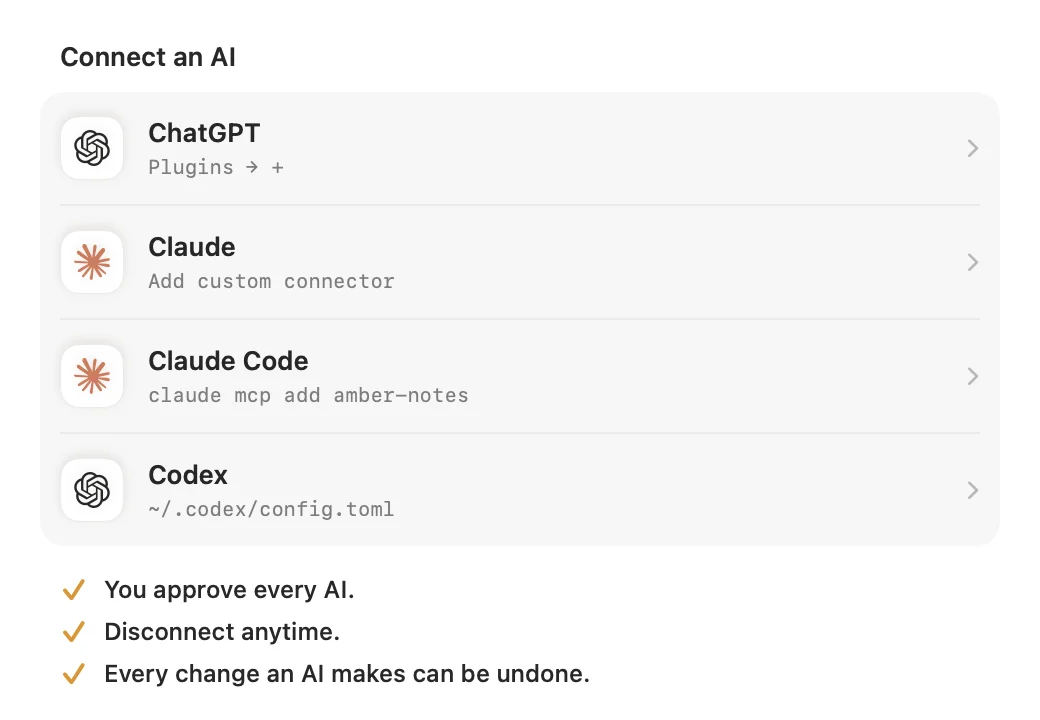
- It works from ChatGPT, Claude on the web, desktop and iPhone, Claude Code, Codex and Incredible, and your Mac doesn't need to be on.
- You approve each AI app in Amber Notes and choose Read Only, or Read and Edit.
- An AI can search, read, create and edit notes, tick checklist items, move and pin notes, and manage folders.
- When an AI changes a note, you see what changed, with Undo, and the previous version stays in the note's history.
Be clear about the trade. Notes are stored as Markdown, but in Amber Notes' sync, not as a folder of files on your disk. There are no plugins, it runs only on iPhone and Mac, and there's no import from Obsidian today. The Mac app is out now; the iPhone app is coming soon to the App Store.
Apple Notes vs Obsidian compares Obsidian with the simplest option. The MCP server page lists every Amber Notes tool. For other notes apps with a server of their own, see notes apps with an MCP server, compared, and for the same question about Apple's app, Apple Notes MCP servers compared.
Questions
Is there an official Obsidian MCP server?
No. Obsidian doesn't make one. The closest official piece is Obsidian CLI, which since Obsidian 1.12 lets you control the app from the terminal, so Claude Code can run its commands. Every Obsidian MCP server is a community plugin or program that runs on the computer with your vault.
Which Obsidian MCP server is the best?
In September 2026, the Local REST API with MCP plugin, if you're happy to keep Obsidian open. It has the server built in, had three releases in September, and can edit one section of a note without touching the rest. If you'd rather not run a plugin, bitbonsai/mcpvault works on the vault's files with Obsidian closed.
Can ChatGPT use an Obsidian MCP server?
Not directly. ChatGPT connects to MCP servers on the internet, and these servers run on your computer. The same goes for claude.ai and the Claude and ChatGPT apps on iPhone. You'd have to expose the server to the internet yourself, with a tunnel and sign-in in front of it.
Does Obsidian need to be open?
For the plugins, yes: the Local REST API and Semantic Notes Vault servers run inside Obsidian on your desktop. Servers that work on the files, such as mcpvault and StevenStavrakis/obsidian-mcp, don't need Obsidian open, but the computer with the vault still has to be on.
Checked against the app on .