An encrypted notes app that ChatGPT and Claude can use

Amber Notes now encrypts every note end to end, on your iPhone or Mac, and ChatGPT and Claude can still read and edit them once you approve. Those two things pull against each other, so here's exactly how it works, what it doesn't protect, and how other notes apps handle the same trade-off.
What's encrypted
Your notes, their titles, folder names, file names and files, and every earlier version are encrypted on your device before they're uploaded. The key is made on your first device. iCloud Keychain carries it to your other iPhone and Mac, and Apple encrypts iCloud Keychain end to end too. We store only the encrypted copies, in Frankfurt, and we can't read them.
- Your recovery key is the fallback when a device can't get the key from iCloud Keychain. You save it yourself, from Settings, Privacy & Security. We keep your notes' key only locked with it, and we never get the recovery key.
- Locked notes are encrypted a second time, with a key made from your notes password. That key never leaves your devices.
- Signing in, with Apple or a password, only says who you are. Your password has nothing to do with your notes' key.
How an AI reads encrypted notes
ChatGPT and Claude run in the cloud, so something has to open your notes for them. Here's how it goes:
- You start connecting from ChatGPT or Claude. A page on ambernotes.app asks you to sign in and shows a two-digit number.
- Amber Notes on your iPhone or Mac asks whether to allow it. You type the number, choose Read Only or Read and Edit, and confirm with Face ID, Touch ID or your passcode.
- That connection gets a copy of your notes' key, locked with a secret only the AI holds.
- During each of the AI's requests, our server unlocks the key in memory, reads the notes it asks for, encrypts any change it makes, and forgets the key when the request ends.
- Disconnect it in Settings, Connect an AI, and its copy of the key is deleted at once.
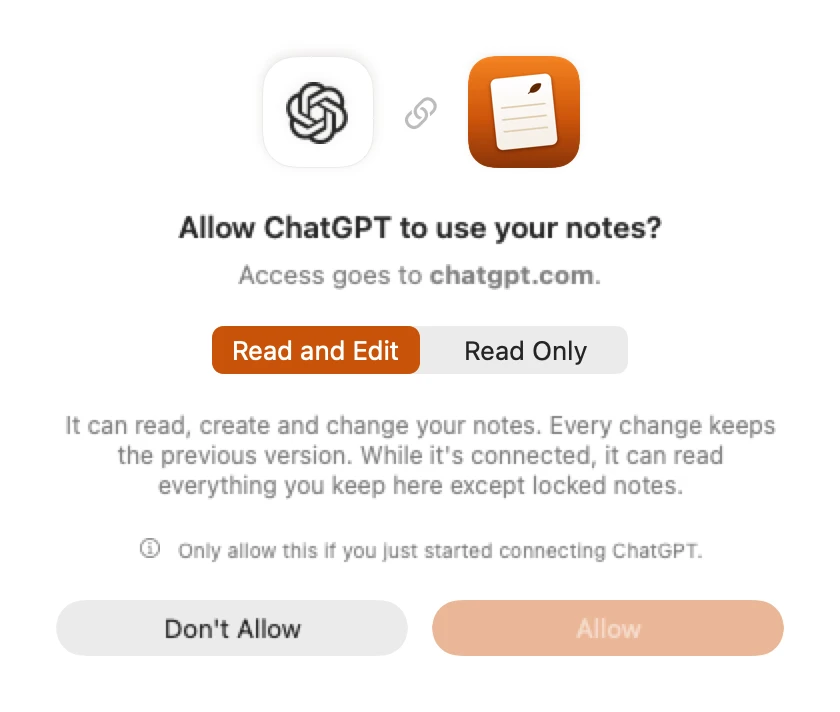
So the honest version is: we can't read your notes at rest, but while an AI you approved is connected, our server opens the notes it asks for, in memory, to answer it. Locked notes stay out of reach even then; an AI sees only their titles. The consent sheet says so before you allow anything.
The limits
- AI requests. While an AI works, our server handles the text it asks for, and our hosts (Vercel and Supabase) carry that text on its way. Neither stores it, but a changed server could copy it. Disconnecting ends this at once.
- The recovery key in the browser. Approving on ambernotes.app with your recovery key runs our code in your browser. It never stores or sends the key, but a changed page could read it. Approve from your iPhone or Mac when you can.
- No key rotation yet. Your notes' key stays the same for the life of your account.
- The database. Someone running it can't read your notes, but could roll a note back to an earlier encrypted version, or hide notes from your devices.
- Shared notes. A note you share as a web page is published as a readable copy while it's shared.
Some details also stay readable to us, including:
- your email address and your sign-in records
- your profile name and photo
- your notes-password hint
- the size and dates of each note, file and version
- which folder each note is in, and which notes are sub-notes of which
- which notes are pinned, and which are locked
- the names of the AI apps that edited a note
- your list of devices
The full list, every log and how long each is kept are on Privacy & Security, and the code is open source.
How other notes apps handle it
End-to-end encryption and a cloud AI want opposite things: the first keeps the server blind, and the second needs someone to read the text. Every app picks a side, or finds a way round it on your own computer.
| App | End-to-end encrypted | Can a cloud AI reach it? | How |
|---|---|---|---|
| Amber Notes | Yes, every note; key in iCloud Keychain | Yes, from any device | Built-in MCP server; our server opens the notes an approved AI asks for, during its requests |
| Apple Notes | With Advanced Data Protection turned on; locked notes always | No | No API; Claude's desktop extension and community servers work on your Mac only |
| Standard Notes | Yes, keys from your password | No official way | A community MCP server decrypts on your own computer, for Claude Desktop |
| Notesnook | Yes | No official way | No official MCP server; third-party ones exist, so check how they get your key |
| Obsidian | Files are local; Obsidian Sync is end to end | No official way | Community plugins and servers on your computer |
| Notion | No; encrypted at rest, readable to Notion | Yes | Official hosted MCP server |
If you never want a server to see your text, a local setup is the stricter choice: Standard Notes with a local MCP server, or Obsidian with a plugin, works while that computer is on. If you want ChatGPT on your phone to add to a list while you're out, something in the cloud has to read it, and the question becomes who, when, and whether you can see and end it. Amber Notes' answer is: only for an AI you approved on your own device, only during its requests, never for locked notes, and never at rest.
Notes apps with an MCP server, compared covers the AI side in more depth, and Apple Notes MCP servers compared covers the Mac-only route for Apple Notes.
Try it
Amber Notes is free and open source. The Mac app is on the download page, and the iPhone app is in App Store review. Import your Apple Notes on the Mac, then connect ChatGPT or Claude. You can pick Read Only first and see what it does.
Questions
Is Amber Notes end-to-end encrypted?
Yes. Your notes, their titles, folder names, file names and files, and every earlier version are encrypted on your iPhone or Mac before they're uploaded, with a key that iCloud Keychain carries between your devices. We store only the encrypted copies and can't read them.
If the notes are encrypted, how can ChatGPT read them?
When you approve an AI on your iPhone or Mac, that connection gets a copy of your notes' key, locked with a secret only the AI holds. During each of its requests, our server unlocks the key in memory, reads the notes the AI asks for, and forgets the key when the request ends. Disconnecting deletes that copy.
Can an AI read my locked notes?
No. Locked notes are encrypted a second time with a key made from your notes password, which never leaves your devices. An AI sees only their titles.
What can Amber Notes still see?
Account details and structure, not content: your email address, the size and dates of notes, which folder each note is in, which notes are pinned or locked, your devices and your AI connections. The Privacy & Security page lists everything.
Can I change my encryption key?
Not yet. Your notes' key stays the same for the life of your account. Disconnecting an AI deletes its copy of the key, but key rotation isn't built yet.
Checked against the app on .