How to back up Apple Notes

It's easy to assume iCloud backs up your notes. iCloud keeps them in sync, which protects you from losing a phone and not much else: delete a note or overwrite a paragraph, and the change reaches every device. This guide covers what actually keeps a copy of your Apple Notes, and the routine I'd use.
The short answer
Export your notes to files and keep those files somewhere other than your iCloud account. On a Mac, an exporter can write every note to Markdown in one go; Apple Notes itself exports one note at a time. Turn on Time Machine as well, and unlock any locked note you want in the copy.
What iCloud protects you from
With iCloud, every device signed in to your Apple Account has the same notes, so losing a phone doesn't lose them. A mistake travels the same way, though. A deleted note leaves every device and waits in Recently Deleted for 30 days, then it's gone. A paragraph you delete or overwrite can't be brought back, because Apple Notes keeps no version history. And an iPhone backup won't help, since iCloud Backup leaves out notes already stored in iCloud. If you're past that point already, how to recover deleted Apple Notes covers what can still be done.
Your options
| What it copies | Limits | |
|---|---|---|
| Export a note | The note you have open, as Markdown or PDF | One at a time; Markdown needs macOS 26 or iOS 26 |
| An exporter on your Mac | Every note, in its folders, as Markdown files with their attachments | A third-party app; run it again to refresh the copy |
| iPhone backup | Notes in the On My iPhone account | Not iCloud notes; restoring replaces everything on the phone |
| Time Machine | Your Mac's files, including notes in On My Mac | Apple doesn't document restoring a single note from it |
A routine that works
- Once a month, export everything with an exporter such as Apple Notes Exporter, and put the exported folder on an external drive or in a cloud drive that isn't the same iCloud account. The app is free and open source. It writes every note to Markdown in its folders and asks for Full Disk Access to read them. Exporting Apple Notes to Markdown compares it with the alternatives.
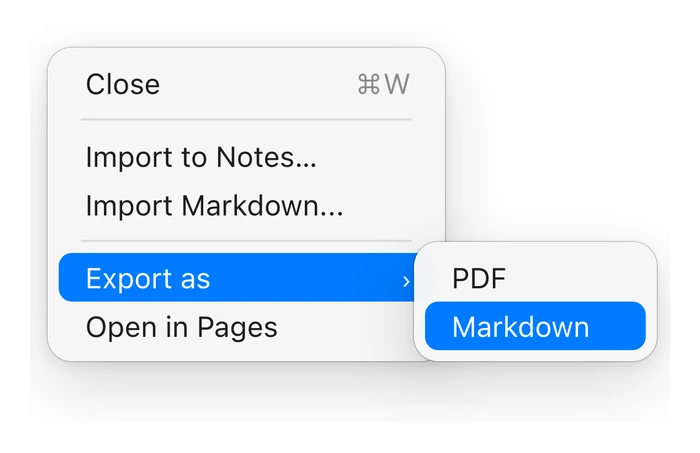
- Between those runs, export a note you couldn't bear to lose as soon as you finish it. On a Mac running macOS 26, choose File, Export as, then Markdown; on macOS 27 the menu is called Export To. On iPhone, tap the Share button, then Export as Markdown.
If you have a Mac, turn on Time Machine too, so the rest of the Mac is covered along with any notes stored on it.
Exporters can't read locked notes, because a locked note's text is encrypted with your notes password. Unlock the ones you want in the backup, and keep the password in a password manager: if you forget it, nobody can open those notes again.
A notes app that keeps versions
Version history is what helps on an ordinary day, when you or an app changes a note and removes the part you needed, and Apple Notes has none. Amber Notes, the notes app for iPhone and Mac that I make, keeps up to 100 earlier versions of every note, including the ones from before ChatGPT or Claude edited it, and File, Show Version History puts any of them back. Deleted notes stay in Recently Deleted for 30 days, as in Apple Notes. When you want your own copy, Settings, Privacy & Security, Export Your Notes saves every note as Markdown in its folder, with its files.
Moving from Apple Notes takes one import on your Mac and leaves Apple Notes as it was.
Questions
Does iCloud back up Apple Notes?
iCloud keeps your notes in sync, so you don't lose them with a phone. It doesn't keep old copies: a note you delete is deleted on every device after 30 days in Recently Deleted, and Apple Notes has no earlier versions of a note to restore.
Are Apple Notes in my iPhone backup?
Only the notes in the On My iPhone account. Apple says iCloud Backup doesn't include notes that are already stored in iCloud.
How do I back up all my Apple Notes at once?
Use an exporter on your Mac, such as the free, open-source Apple Notes Exporter, which writes every note to Markdown files in their folders. Apple Notes itself exports one note at a time.
Can I back up locked notes?
A locked note's text is encrypted with your notes password, so no exporter can read it while it's locked. Unlock the notes you want in the backup first, and keep the password somewhere safe.
Checked against the app on .