How to move Apple Notes from On My iPhone or Gmail to iCloud

Apple Notes keeps each note in an account. Most people's notes are in iCloud, but some can sit in On My iPhone, which never leaves the phone, or in an email account such as Gmail. Only iCloud notes reach all your devices with every feature, and notes in the other accounts stay put until you move them. Moving them takes a few taps on iPhone or a drag on a Mac, though locked notes and Gmail notes need some care first.
See where your notes are
On iPhone, go back to the folders list in Notes. Folders are grouped by account, under headings such as iCloud and On My iPhone. On a Mac the same groups are in the sidebar; if it's hidden, choose View, Show Folders on macOS 26, or View, Show Sidebar on macOS 27.
If there's no iCloud heading, turn on iCloud for Notes. On iOS 26, open Settings, tap your name, tap iCloud and turn on Notes. On iOS 27, tap See All next to Saved to iCloud first, then turn on Notes.
Before you move anything
Apple's guide warns that moving notes from one account to another can permanently lose formatting and attachments, and that drawings can turn into image files you can no longer edit as drawings. On a Mac, hold Option while you drag, and Notes copies the notes instead of moving them. Check the copies in iCloud before you delete the originals. Apple's iPhone guide describes moving only, so back up first: notes in On My iPhone are part of your iPhone backup, and how to back up Apple Notes covers the rest.
Locked notes need one more step, because Apple's Mac guide says they move only between iCloud and the account on your Mac, and that you may need to unlock them first. Each account can also have its own notes password. Remove the lock before you move a note, then lock it again once it's in iCloud. On iPhone, tap the locked note, tap View Note and unlock it. Then tap the More button and choose Remove. If you've lost the password for a locked note, nobody can open it, and what to do if you forgot your Apple Notes password explains why.
Shared notes are already in iCloud, since only iCloud notes can be shared. Apple's Mac guide adds that a shared note can only move between folders in the same iCloud account, which matters if you use two Apple Accounts.
Move notes on iPhone
- Open the folder that holds the notes, such as Notes under On My iPhone or under Gmail.
- Tap the More button, then Select Notes, and tap each note you want to move. Tap the Folder button and choose a folder under iCloud.
For a single note, touch and hold it, tap Move and choose the folder. To bring a whole folder across, create a folder with the same name under iCloud and move its notes into it.
Move notes on a Mac
Select the notes in the list, then drag them onto a folder under iCloud in the sidebar. Hold Option as you drop if you want copies first.
The same applies to On My Mac, the Mac's own local account. Once it's empty you can turn it off by clearing Enable the On My Mac account in Notes, Settings. Notes won't turn it off while it still holds notes, and asks you to move or delete them first.
Gmail notes are different
Notes in a Gmail account are kept in your Google account and sync with Notes over IMAP, the protocol Mail uses. Apple says many Notes features don't work there, and those notes can't be locked. On macOS 26, Notes also turns down tags and pinning in an IMAP account, with a message saying they aren't supported. When you delete one, Gmail usually keeps it in that account's Trash in the Mail app rather than in Recently Deleted.
Apple says notes moved from another account into iCloud can use every feature. To stop the Gmail account syncing notes once it's empty, open Settings, tap Apps, then Notes, then Notes Accounts, tap the Gmail account and turn off Notes. Mail keeps working, and any notes still in Gmail stay in your Google account.
After the move
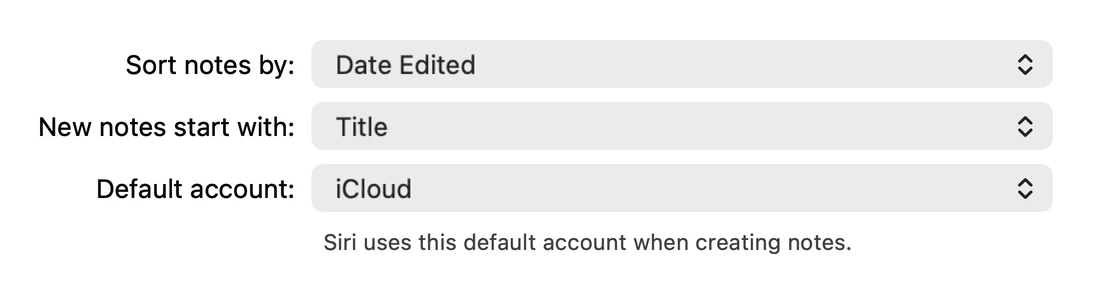
Set iCloud as the default account, or the next note Siri makes may go back into the old account. On iPhone it's Default Account in Settings, Apps, Notes. On a Mac it's Default account in Notes, Settings, which Notes says Siri uses when creating notes.
Moving also changes what your iPhone's iCloud backup holds. Notes in On My iPhone are part of it, and Apple leaves out notes that are already stored in iCloud. Deleting a note in iCloud removes it from every device after 30 days in Recently Deleted, so keep a copy of your own as well.
Moving to another notes app
Amber Notes, the notes app for iPhone and Mac that I make, syncs every note between your devices once you sign in, and ChatGPT and Claude can read and edit those notes after you approve them. Moving from Apple Notes takes one import on your Mac and leaves Apple Notes as it was.
Questions
Why are some of my notes in On My iPhone?
On My iPhone is an account for notes kept only on that phone. It appears once it's turned on in Settings, Apps, Notes, and new notes made by Siri or the Notes widget go to whichever account is set as the Default Account there.
Will moving notes to iCloud remove them from my iPhone?
No. iCloud notes stay on your iPhone and also appear on every other device signed in to the same Apple Account with Notes turned on for iCloud.
Can I move Gmail notes to iCloud?
Yes. Gmail notes show up as their own account in Notes, and you move them into an iCloud folder the same way as notes from On My iPhone. Afterwards you can turn off Notes for the Gmail account.
Why can't I lock my Gmail notes?
Apple says notes that sync over IMAP, with accounts like Gmail and Yahoo, can't be locked. Once a note is in iCloud you can lock it, unless it has tags or a file attached, such as a PDF or a recording.
Checked against the app on .