Apple Notes not syncing between iPhone and Mac: how to fix it

Apple Notes syncs through iCloud. A note reaches your Mac only if it's stored in iCloud and both devices are signed in to the same Apple Account with Notes turned on for iCloud. When a note made on your iPhone doesn't show up on your Mac, the cause is nearly always in those settings, so check them first. Full iCloud storage and a Mac still on an older macOS than your iPhone come after that.
1. Check that Notes is turned on for iCloud
On iPhone with iOS 27, open Settings, tap your name, then iCloud. Tap See All next to Saved to iCloud, tap Notes and make sure Sync this iPhone is on. On iOS 26, it's Settings, your name, iCloud, Notes. Apple says that if notes are still missing after this, restart the iPhone and check the setting again.
On a Mac with macOS 15 or later, including macOS 26 and 27, choose Apple menu, System Settings, click your name, then iCloud. Under Saved to iCloud, click Notes and turn on Sync this Mac. In Notes, iCloud then appears in the sidebar, and choosing All iCloud shows every note it holds.
2. Check that both devices use the same Apple Account
Your name at the top of Settings on iPhone, and at the top of System Settings on a Mac, is the Apple Account that device syncs with. Apple's guide says a device that isn't signed in to the same account, or has Notes turned off, can't see your iCloud notes. A work Mac signed in to a company Apple Account won't show the notes from your own iPhone.
3. Check which account the note is in
Notes groups folders by account. Only notes under the iCloud heading sync. Notes under On My iPhone or On My Mac stay on that one device, and notes under Gmail or another email account sync with that email account, not with iCloud. If the missing note sits in one of those, move it into an iCloud folder, and it reaches your other devices.
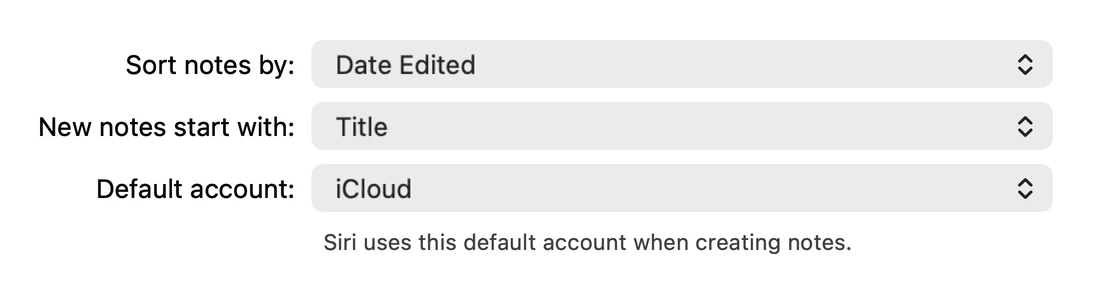
Then check where new notes go, or the next note Siri makes may land in the wrong account again. On iPhone it's Default Account in Settings, Apps, Notes. On a Mac it's Default account in Notes, Settings, as in the picture above.
4. See whether iCloud has the note
Open icloud.com/notes in a browser and sign in with the same Apple Account. If the note is there, iCloud has it, and the device that's missing it is the one to fix: go back to step 1 on that device and restart it. If the note isn't there, the device where you wrote it hasn't uploaded it yet, so start with that one.
Apple also lists iCloud Notes on its System Status page, at apple.com/support/systemstatus. If it shows an outage, no setting on your side will fix it, so wait until Apple marks it resolved.
5. Check your iCloud storage
Apple says that when your iCloud storage is full, iCloud Drive and other iCloud apps don't stay up to date across your devices, and your device stops backing up to iCloud. Notes is one of those apps. To see how much you're using, open Settings, tap your name, then iCloud. Freeing some space or moving to a bigger plan lets syncing continue.
6. Update the device that's behind
A note made with a newer version of Notes can use features an older one doesn't have. On a Mac, Notes then shows the note with the message “This note uses unsupported features. To view or edit it, upgrade to the latest version of macOS.” In that case the note has synced, but this Mac can't open it. Since iOS 27 came out on 14 September, an iPhone on iOS 27 with a Mac still on macOS 26 is the likely setup for this, and updating the Mac to macOS 27 is the fix.
For much older devices, Apple's Mac guide says notes in iCloud that have been upgraded can't be opened on versions earlier than OS X 10.11 or iOS 9, and that the Notes sidebar shows an Upgrade button next to iCloud until you upgrade.
When a shared note won't update
Apple's guide for collaborating in Notes asks for an iPhone on the latest iOS, signed in to an Apple Account with Sync this iPhone turned on for Notes. You can't collaborate on a locked note, or on a folder that holds one. On iOS 27, sharing has moved: tap the Share button, then Share a Link or Send a Copy, and set who can edit under People you choose can edit.
A shared note is stored in its owner's iCloud. When the owner's storage is full, Notes on a Mac says your changes can't be uploaded, are saved on your device, and will be uploaded once the owner creates space. If Notes asks you to upgrade your account security “to see edits in real time and use the latest collaboration features”, others' edits won't show live until you do.
If notes vanished from every device
Deleting a note on one device deletes it everywhere, which can look like a sync problem. Deleted notes stay in Recently Deleted for 30 days on every device signed in to the same Apple Account. How to recover deleted Apple Notes covers that folder and what to try after the 30 days. Keeping your own copy helps too, and how to back up Apple Notes shows how.
A notes app that shows its sync
Apple Notes doesn't show when it last synced. Amber Notes, the notes app for iPhone and Mac that I make, syncs through its own end-to-end encrypted service rather than iCloud, so iCloud storage doesn't affect it. Its Settings show the sync status, such as “last synced 9:41” or the reason it can't sync right now, next to a Sync Now button. If the same note changed on two devices before they synced, the newer edit wins and the other is kept as a conflicted copy, so neither is lost.
The Mac app is out now, and the iPhone app is coming soon to the App Store. Moving from Apple Notes takes one import on your Mac and leaves Apple Notes as it was.
Questions
Why are my notes not syncing between my iPhone and Mac?
Most often Notes is turned off for iCloud on one of the devices, or the two are signed in to different Apple Accounts. Notes kept in On My iPhone or in Gmail never sync through iCloud, and a full iCloud storage plan stops syncing too. Apple's own fix is to check Sync this iPhone in iCloud settings, then restart the device if notes are still missing.
How do I force Apple Notes to sync?
Apple doesn't document a button that forces a sync. What Apple suggests is checking that Notes is turned on for iCloud and restarting the device. Opening icloud.com/notes in a browser shows whether a note made it to iCloud at all.
Do notes in On My iPhone sync to my Mac?
No. On My iPhone is for notes kept only on that phone, and On My Mac is the same on a Mac. Move the notes into an iCloud folder and they appear on every device signed in to the same Apple Account.
Why isn't a shared note updating?
Check that everyone is signed in to their Apple Account with Notes turned on in iCloud, and that the note isn't locked, since locked notes can't be shared. If the owner's iCloud storage is full, Notes keeps your changes on your device and uploads them once the owner frees up space.
Checked against the app on .